Welcome to this introduction to Linear Mixed-effects Models (LMM)!! In this tutorial, we will use R to run some simple LMMs, and we will try to understand together how to leverage these models for our analysis.
LMMs are amazing tools that have saved our asses countless times during our PhDs and Postdocs. They'll probably continue to be our trusty companions forever.
Note
This tutorial offers a gentle introduction to running linear mixed-effects models without diving deep into the mathematical and statistical foundations. If you’re interested in exploring those aspects further, plenty of online resources are available.
For the best experience, you should have already completed the previous tutorial on linear models. That foundation will make this tutorial much easier to follow and understand!
This tutorial introduces the statistical concept of hierarchical modeling, often called mixed-effects modeling. This approach shines when dealing with nested data: situations where observations are grouped, like multiple classes within a school or multiple measurements for each individual.
This might not mean a lot to you: why bother with understanding the structure of the data? Can’t we just run our simple linear models we’ve already learned about? Well well well, let us introduce you to the Simpson’s Paradox.
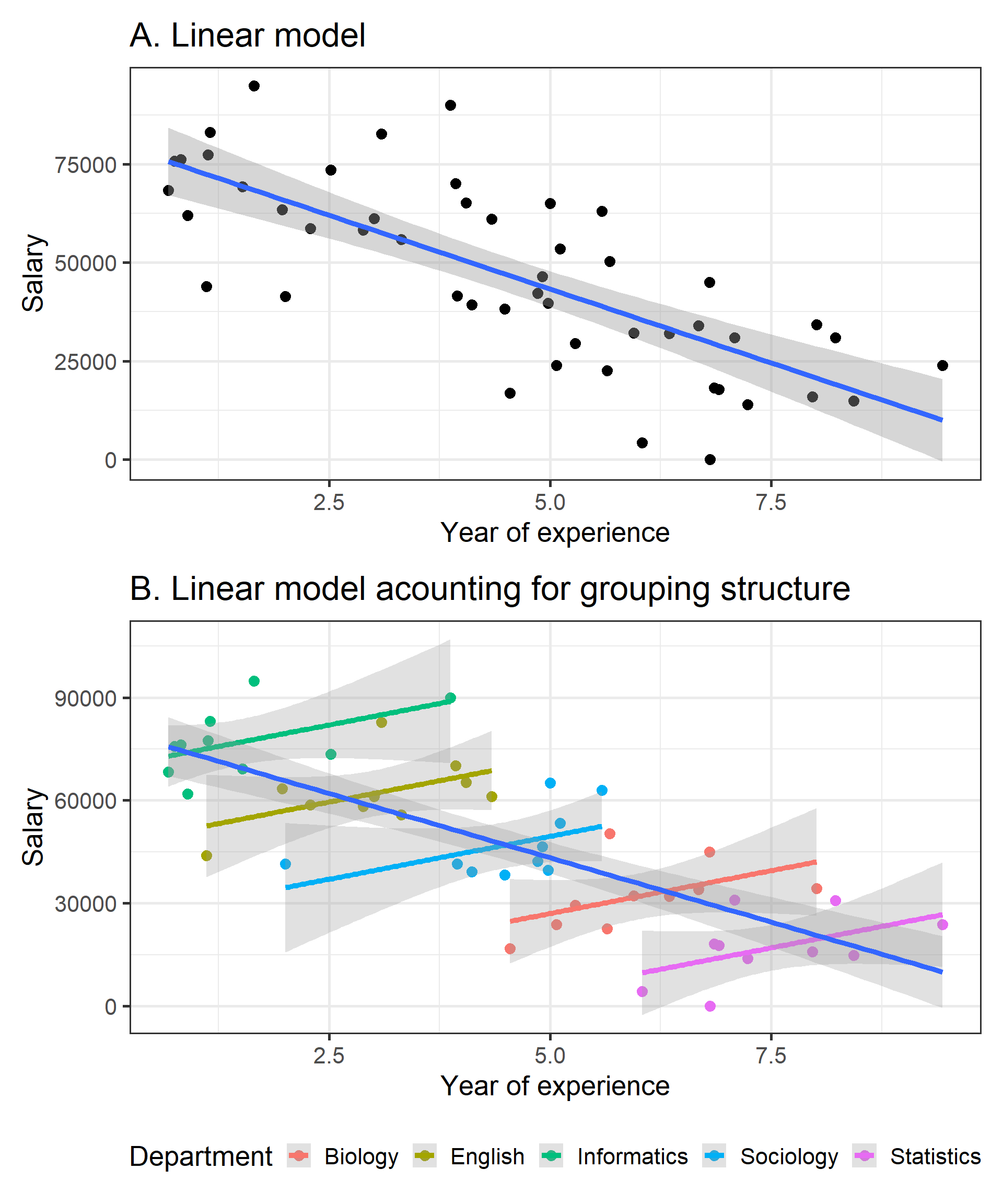
Imagine we’re looking at how years of experience impact salary at a university:
Code
library(easystats)library(tidyverse)library(patchwork)set.seed(1234)data<-simulate_simpson(n =10, groups =5, r =0.5,difference =1.5)%>%mutate(V2=(V2+abs(min(V2)))*10000)%>%rename(Department =Group)# Lookup vector: map old values to new oneslookup<-c(G_1 ="Informatics", G_2 ="English", G_3 ="Sociology", G_4 ="Biology", G_5 ="Statistics")# Replace values using the lookup vectordata$Department<-lookup[as.character(data$Department)]one=ggplot(data, aes(x =V1, y =V2))+geom_point()+geom_smooth(method ='lm')+labs(y='Salary', x='Year of experience', title ="A. Linear model")+theme_bw(base_size =20)two=ggplot(data, aes(x =V1, y =V2))+geom_point(aes(color =Department))+geom_smooth(aes(color =Department), method ="lm", alpha =0.3)+geom_smooth(method ="lm", alpha =0.3)+labs(y='Salary', x='Year of experience', title ="B. Linear model acounting for grouping structure")+theme_bw(base_size =20)+theme(legend.position ='bottom')(one/two)
Take a look at the first plot. Whoa, wait a minute: this says the more years of experience you have, the less you get paid! What kind of backwards world is this? Before you march into HR demanding answers, let’s look a little closer.
Now, check out the second plot. Once we consider the departments (Informatics, English, Sociology, Biology, and Statistics) a different story emerges. Each department shows a positive trend between experience and salary. In other words, more experience does mean higher pay, as it should!
So what happened? Well, Simpson’s Paradox happened! By ignoring meaningful structure in the data (lumping all departments together), we might completely miss the real relationship hiding in plain sight. This is why hierarchical modeling is so powerful: it allows us to correctly analyze data with nested structures and uncover the real patterns within them.
A Mix of fixed and random effects
So, why are they called mixed effects models? It’s because these models combine two types of effects: fixed effects and random effects. And now you’re wondering what those are….. Don’t worry, we’ve got you! 😅
Fixed effects are the effects you actually want to interpret: the average, systematic relationship in the whole dataset (e.g., how salary changes with experience).
Note
Remember when we looked at the effects of Condition (Event Simple vs Complex) and Trial Number (TrialN) in the previous tutorial on linear models? Those were fixed effects!
Random effects tell the model that observations come in groups (departments, participants) and that each group can have its own quirks. You might not be interested in each group specifically, but modelling those groups keeps the fixed-effect estimates honest: Without accounting for random effects, it’s like assuming every department is exactly the same: and we’ve already seen how misleading that can be!
Still confused? Let’s look at this from a different angle: our dataset has variability in it. For example, different departments vary in salary, different participants vary in their looking times. Random effects are a way to say to our model: hey, watch out, we should keep track of this variability!
Got the gist? Great! Next, we will dive back into the same real example that accompanied us through previous tutorials to see mixed effects in action!
Setting things up
In this section, we’ll set up our working environment by loading the necessary libraries and importing the dataset. You’ll likely already have this dataset available if you completed the previous linear models tutorial. If not, you can download it here:
The lme4 package is the go-to library for running Linear Mixed Models (LMM) in R. To make your life easier, there’s also the lmerTest package, which enhances lme4 by allowing you to extract p-values and providing extra functions to better understand your models. In our opinion, you should always use lmerTest alongside lme4, it just makes everything smoother!
On top of these two packages, the tidyverse suite will help with data wrangling and visualization, while easystats will let us easily extract and summarize the important details from our models. Let’s get started!
Read the data
Code
df=read.csv("resources/Stats/Dataset.csv")df$Id=factor(df$Id)# make sure subject_id is a factordf$StandardTrialN=standardize(df$TrialN)# create standardize trial column
After importing the data, we’ve ensured that Id is treated as a factor rather than a numerical column and that we have a standardized column of TrialN.
The problem with simple linear models
While we have already seen how to run a linear model, we will rerun it here to directly compare it to a mixed-effect model.
mod_lm=lm(LookingTime~StandardTrialN*Event, data =df)summary(mod_lm)
Call:
lm(formula = LookingTime ~ StandardTrialN * Event, data = df)

Residuals:
    Min      1Q  Median      3Q     Max
-609.15 -212.47   13.17  218.58  676.70

Coefficients:
                           Estimate Std. Error t value Pr(>|t|)
(Intercept)                 1419.44      19.51  72.740  < 2e-16 ***
StandardTrialN               -71.50      19.41  -3.683 0.000264 ***
EventSimple                 -266.39      27.53  -9.677  < 2e-16 ***
StandardTrialN:EventSimple   -50.01      27.28  -1.833 0.067605 .
---
Signif. codes:  0 '***' 0.001 '**' 0.01 '*' 0.05 '.' 0.1 ' ' 1

Residual standard error: 268.1 on 376 degrees of freedom
  (20 observations deleted due to missingness)
Multiple R-squared:  0.2892,    Adjusted R-squared:  0.2835
F-statistic: 50.99 on 3 and 376 DF,  p-value: < 2.2e-16
We won’t go too much into detail on the model results in this tutorial, as we have already covered it in the previous one. However, we want to point out one thing about the data we run it on!!
Wait a minute! Look at our data - we have an Id column! 👀 This column tells us which participant each trial belongs to. As each subject experienced all trial conditions, we have multiple data points per person. This is similar to the departments in the previous example… it’s a grouping variable!
Instead, there was nothing about Id in our lm()…there is nothing in the formula about Id. Wait… but then we should have taken it into consideration!!! This is a problem for two reasons: First, there might be meaningful variability across participants (just as there was variability in salary across departments). Second, we are violating an assumption of linear regression: data points should be independent! In other words, each row in our dataframe should come from a different group. But here multiple rows come from the same participant! This is a BIG problem!
In our lm(), there was nothing about Id… the model is treating every row as if it were independent! That’s a problem for two reasons. First, participants often differ in meaningful ways (some have consistently longer looking times than others, just like departments differed in salary). Second, one of the assumptions of linear regression is that residuals are independent; with repeated measures, rows from the same participant tend to be correlated even after accounting for the predictors. If we ignore that grouping structure, the model can become overconfident (standard errors too small), and our conclusions can be misleading.
Let’s fix that!! How do we do it? Well, at this point it’s obvious… with Mixed effects models!!
Random Intercept
Even if there are two types of random effects, let’s introduce them one by one, starting with random intercepts! What are they? Well, the name gives it away… they’re just intercepts, but with a twist! 🤔
If you recall your knowledge of linear models, you’ll remember that each model has one intercept: the point where the model crosses the y-axis (when x=0).
But what makes random intercepts special? They allow the model to have different intercepts for each grouping variable (in this case, the IDs). This means we’re letting the model assume that each subject may have a slightly different baseline looking time.
Here’s the idea:
One person might naturally be a bit faster at looking at stimuli.
Someone else could be slightly slower.
And us? Well, let’s just say we’re starting from rock bottom.
Now, let’s look at how to include this in our mixed model.
Run the model
To run a linear mixed-effects model, we’ll use the lmer function from the lme4 package. It works very similarly to the lm function we used before: you pass a formula and a dataset, but with one important addition: w e must specify the random intercept.
To do that, we simply add (1|Id) to the formula, to tell the model that each subject should have its own unique intercept. This accounts for variations in baseline looking time across individuals.
Caution
When specifying random intercepts (like (1|Group)), your grouping variables must be factors! If a grouping variable is numeric, R will wrongly treat it as a continuous variable rather than discrete categories. Character variables are automatically fine, but numeric grouping variables must be explicitly converted using factor().
Linear mixed model fit by REML. t-tests use Satterthwaite's method [
lmerModLmerTest]
Formula: LookingTime ~ StandardTrialN * Event + (1 | Id)
   Data: df

REML criterion at convergence: 4774.7

Scaled residuals:
    Min      1Q  Median      3Q     Max
-3.7640 -0.5509  0.0426  0.5462  2.7304

Random effects:
 Groups   Name        Variance Std.Dev.
 Id       (Intercept) 59981    244.9
 Residual             14531    120.5
Number of obs: 380, groups:  Id, 20

Fixed effects:
                           Estimate Std. Error       df t value Pr(>|t|)
(Intercept)                1418.273     55.468   19.493  25.569  < 2e-16 ***
StandardTrialN              -51.123      8.781  357.118  -5.822 1.29e-08 ***
EventSimple                -261.851     12.480  357.153 -20.981  < 2e-16 ***
StandardTrialN:EventSimple  -85.062     12.404  357.212  -6.858 3.09e-11 ***
---
Signif. codes:  0 '***' 0.001 '**' 0.01 '*' 0.05 '.' 0.1 ' ' 1

Correlation of Fixed Effects:
            (Intr) StndTN EvntSm
StandrdTrlN  0.005
EventSimple -0.113 -0.020
StndrdTN:ES -0.003 -0.715 -0.008
Wow! Now the model is showing us something new compared to the simple linear model. We observe an interaction between Event and StandardTrialN. By letting the intercept vary for each subject, the model is able to capture nuances in the data that a standard linear model had completely missed!
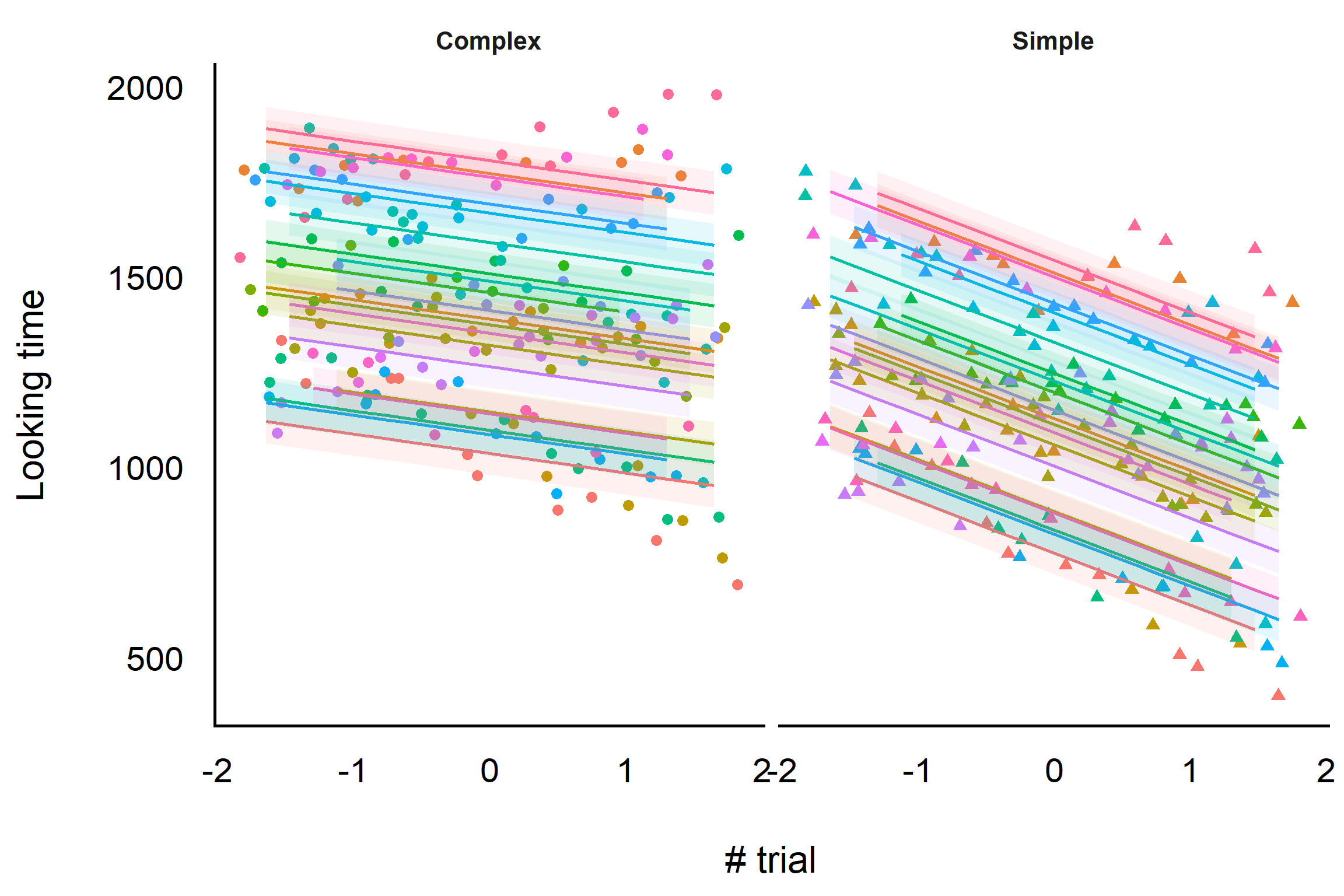
To understand this interaction, let’s plot what the random intercept is doing.
As you can see here, each color represents a different subject, and we’ve divided the plot into two panels - one for each type of event - to make visualization simpler.
You can clearly see that our model is capturing the different intercepts that subjects have!! Cool, isn’t it??
Now, this looks fancy, but where are our fixed effects, the ones we care about? While what we’ve plotted is how the data is modeled by our mixed-effects model, the random effects are actually used to make more accurate estimates for thefixed effects. That’s why our interaction is now significant.
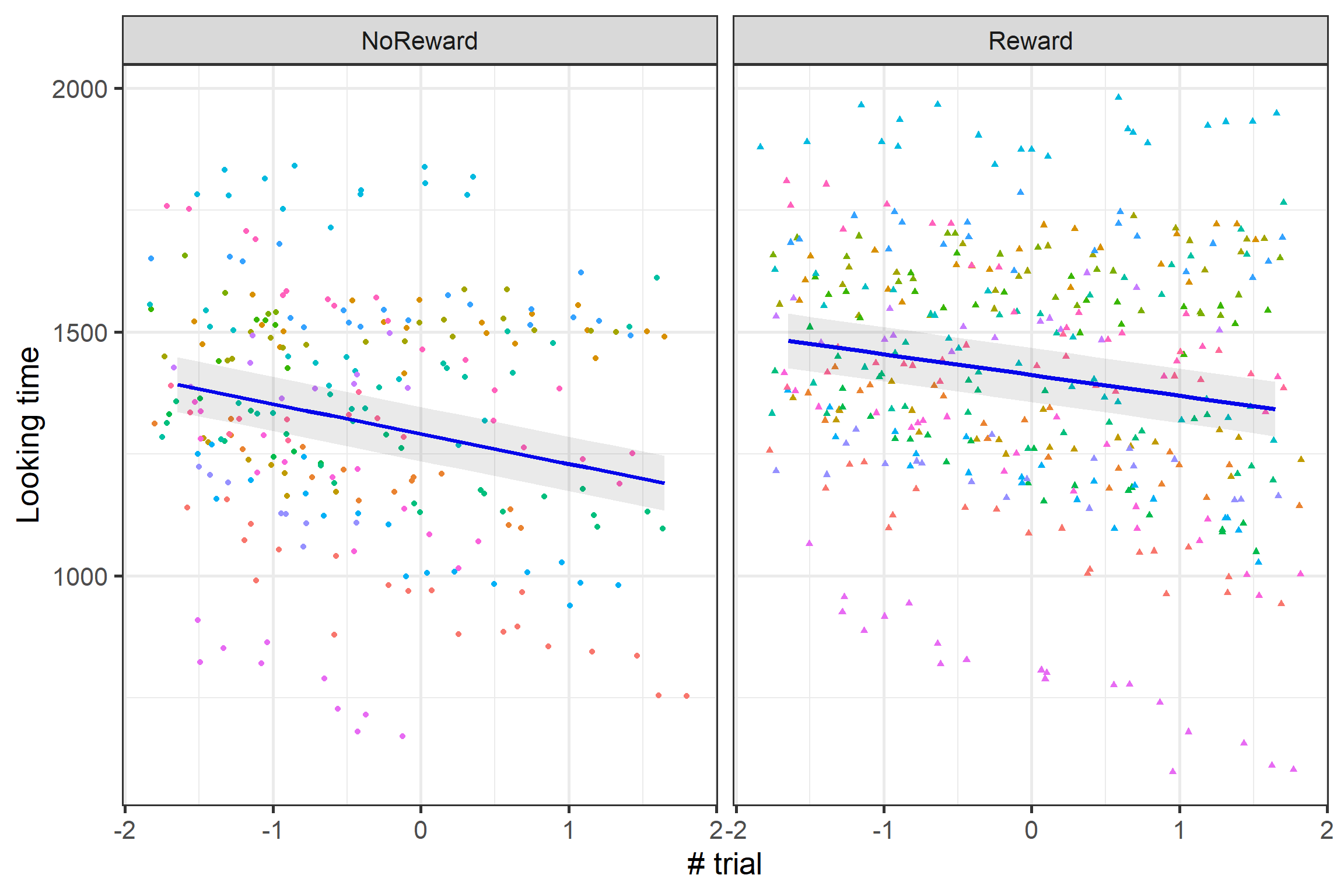
Instead of all these individual estimates we can plot their average:
Pheew, that’s a relief! Not only we can look at unique individual differences in looking time, but we also get our main effects - just as we did with our simple linear model - new and improved! The significant interaction between Condition and Trial Number is reflected in the plot: It seems that looking times decrease for both Complex and Simple stimuli, but they decrease more for Simple ones!
Random Slope
So far, we’ve modeled a different intercept for each subject, which lets each subject have their own baseline looking time. But here’s the catch: our model assumes that everyone changes over the trials in exactly the same way, with the same slope. But infants might differ in how long they look at the stimuli over time! Some of them might quickly get bored and look much less, while others might stay curious and keep looking at them.
Run the model
This is where random slopes come in handy: they capture variability in the slopes. By adding (0 + StandardTrialN | Id), we’re telling the model that while the intercept (starting point) is the same for everyone, the rate at which each subject changes (the slope) can vary.
Caution
Any variable used as a random slope (before the |) must also be included as a fixed effect in your model. The fixed effect estimates the overall effect, while the random slope captures how that effect varies across groups. Without the fixed effect, you’re modeling deviations from zero instead of from an average, which rarely makes theoretical sense.
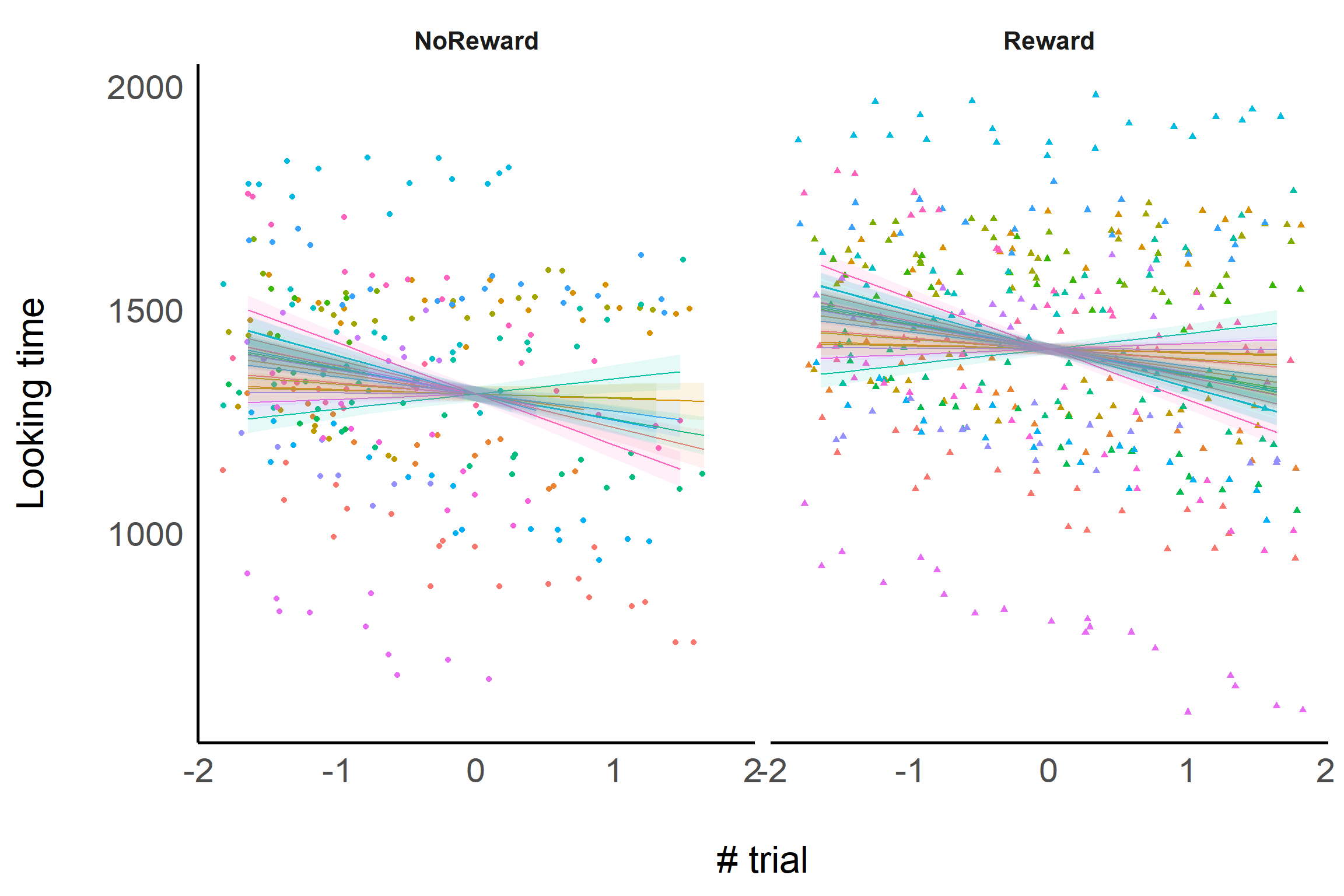
As you can see here we have an unique intercept ( all the lines pass trough the same point where x = 0) but the slope of each line is different. And….. I don’t have to tell you that what we are looking at dosen’t really make sense.
Random Incercept & Slope
That plot does look nuts, and it’s a clear signal that something is off. Why? Because by modeling only the random slopes while keeping the intercepts fixed, we’re essentially forcing all subjects to start from the same baseline. That’s clearly unrealistic for most real-world data.
In real life, the intercept and slope often go hand-in-hand for each subject.
Run the model
To make the model more realistic, we can model both the random intercept and the random slope together. We simply modify the random effects part of the formula to (trial_number | subject_id).
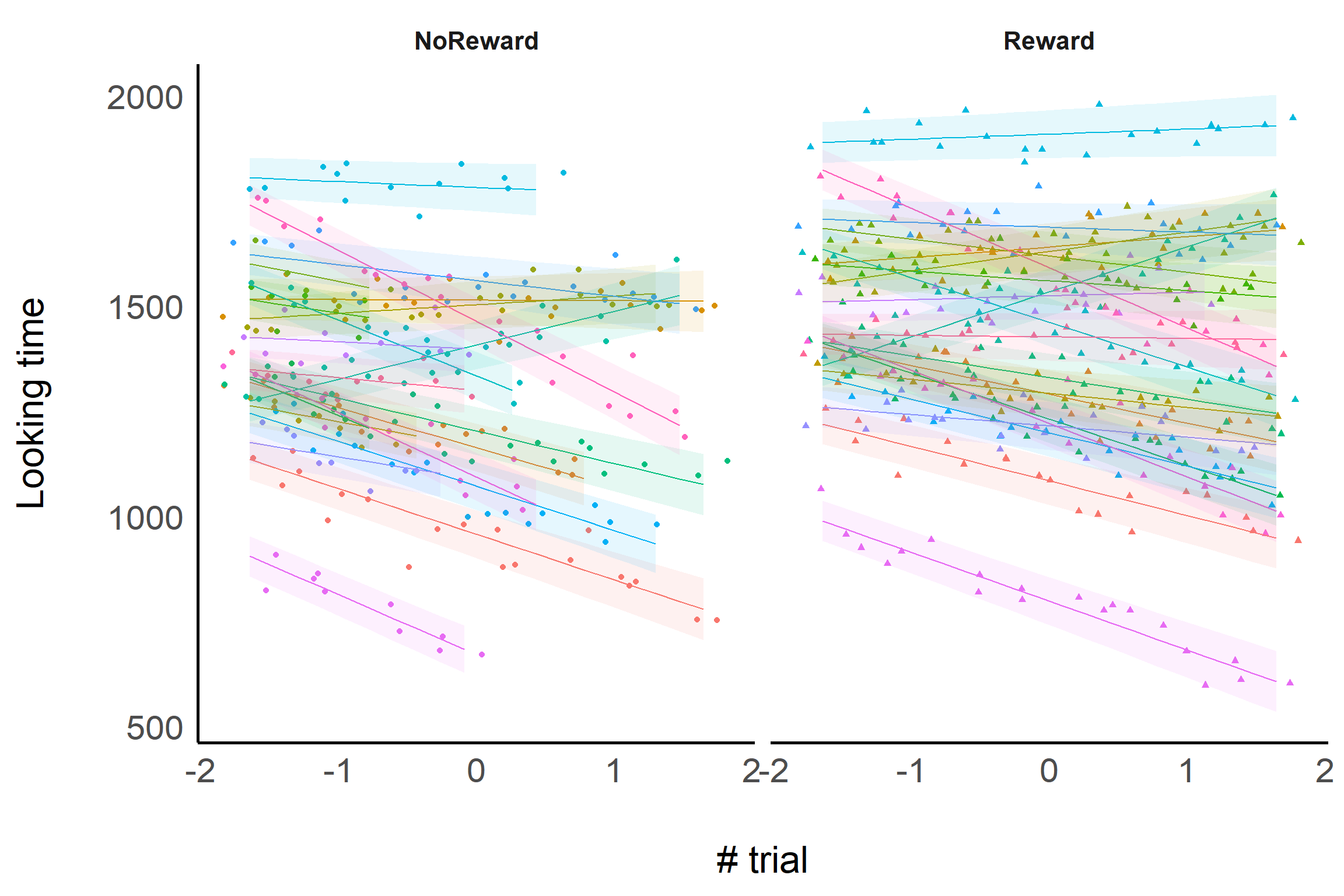
Now, we are telling the model to estimate both a random intercept (baseline looking time) and a random slope (rate of change). This captures the full variability in each participant’s looking time over time!
If you look closely, you’ll see each subject has their own intercept and slope now. That means we’re actually capturing the real differences between infants - exactly what we wanted!
A better look at the model’s output
Now that we’ve seen how to run mixed-effects models, it’s time to focus on how to interpretthe summary output. While we’ve been building models, we haven’t spent too much time on what the summary() function actually tells us or which parts of it deserve our attention. Let’s fix that!
Linear mixed model fit by REML. t-tests use Satterthwaite's method [
lmerModLmerTest]
Formula: LookingTime ~ StandardTrialN * Event + (1 + StandardTrialN |      Id)
   Data: df

REML criterion at convergence: 4320.1

Scaled residuals:
     Min       1Q   Median       3Q      Max
-2.40197 -0.62005  0.02697  0.68028  2.66893

Random effects:
 Groups   Name           Variance Std.Dev. Corr
 Id       (Intercept)    60185    245.33
          StandardTrialN 10981    104.79   0.41
 Residual                 3290     57.36
Number of obs: 380, groups:  Id, 20

Fixed effects:
                           Estimate Std. Error       df t value Pr(>|t|)
(Intercept)                1425.068     55.019   19.115  25.901 2.38e-16 ***
StandardTrialN              -51.595     23.816   19.656  -2.166   0.0428 *
EventSimple                -276.278      6.007  338.381 -45.991  < 2e-16 ***
StandardTrialN:EventSimple  -83.322      6.100  339.010 -13.659  < 2e-16 ***
---
Signif. codes:  0 '***' 0.001 '**' 0.01 '*' 0.05 '.' 0.1 ' ' 1

Correlation of Fixed Effects:
            (Intr) StndTN EvntSm
StandrdTrlN  0.407
EventSimple -0.055 -0.001
StndrdTN:ES -0.001 -0.130 -0.026
The Random effects section in the model summary shows how variability is accounted for by the random effects. The Groups column indicates the grouping factor (e.g., ID), while the Name column lists the random effects (e.g., intercept and slope). The Variance column represents the variability for each random effect. Here, higher values indicate greater variation in how the effect behaves across groups. The Std.Dev. column is simply the standard deviation of the variance, showing the spread in the same units as the data.
The Corr column reflects the correlation between random effects, telling us whether different aspects of the data (e.g., intercepts and slopes) tend to move together. A negative correlation would suggest that higher intercepts (starting points) are associated with smaller slopes (slower learning rates), while a positive correlation would suggest the opposite.
The Residual section shows the unexplained variability after accounting for the fixed and random effects.
The key takeaway here is that random effects capture variability in the data that can’t be explained by the fixed effects alone.
But how can we be sure the random effects are helping our model? One of the easiest ways is to check the variance explained by the random effects. If the variance for a random effect is low, it suggests the random effect isn’t adding much to the model and may be unnecessary. On the other hand, high variance indicates that the random effect is important for capturing group-level differences and improving the model’s accuracy.
However, there is a better way to confidently adjudicate whether our fancy mixed-effect model with random intercept and slope is better: comparing models.
Model comparison
There are many indices to compare model performance. One of the best indices is the Akaike Information Criterion (AIC). AIC gives a relative measure of how well a model fits the data, while penalizing the number of parameters in the model. Lower AIC values indicate better models, as they balance goodness-of-fit with model complexity.
Why AIC?
AIC is great because it balances how well your model fits the data with how many predictors you’re using. If you just keep adding fixed or random effects, the fit will likely improve. Without any additional penalty, you’d end up overfitting: your model would fit the current data perfectly but fail on new data. AIC solves this problem by penalising models with more effects!
The AIC score by itself doesn’t mean much. You usually get wacky values like 24’783. However, it is super useful as a relative measure, for comparing different models against each other. When you do compare models, lower AIC values indicate better models.
You can compare the AIC of different models using the following:
# Comparison of Model Performance Indices

Name              |           Model |  AIC (weights)
----------------------------------------------------
mod_rintercept    | lmerModLmerTest | 4815.8 (<.001)
mod_rinterraction | lmerModLmerTest | 4364.8 (>.999)
As you can see, the best model based on AIC is the one with both intercept and slope. This is a good way to check if and which random effect structure is necessary for our model.
Warning
Never decide if your random effect structure is good by just looking at p-values! P-values are not necessarily related to how well the model fits your data. Always use model comparison and fit indices like AIC to guide your decision.
Formulary
In this tutorial, we introduced linear mixed-effects models. However, these models can be far more versatile and complex than what we’ve just explored. The lme4 package allows you to specify various models to suit diverse research scenarios. While we won’t dive into every possibility, here’s a handy reference for the different random effects structures you can specify
Formula
Description
(1|s)
Random intercepts for unique level of the factor s.
(1|s) + (1|i)
Random intercepts for each unique level of s and for each unique level of i.
(1|s/i)
Random intercepts for factor s and i, where the random effects for i are nested in s. This expands to (1|s) + (1|s:i), i.e., a random intercept for each level of s, and each unique combination of the levels of s and i. Nested random effects are used in so-called multilevel models. For example, s might refer to schools, and i to classrooms within those schools.
(a|s)
Random intercepts and random slopes for a, for each level of s. Correlations between the intercept and slope effects are also estimated. (Identical to (a*b|s).)
(a*b|s)
Random intercepts and slopes for a, b, and the a:b interaction, for each level of s. Correlations between all the random effects are estimated.
(0+a|s)
Random slopes for a for each level of s, but no random intercepts.
(a||s)
Random intercepts and random slopes for a, for each level of s, but no correlations between the random effects (i.e., they are set to 0). This expands to: (0+a|s) + (1|s).
---title: "Linear mixed effect models"date: "15/03/2025"author-meta: "Tommaso Ghilardi"# description-meta: " A concise and practical tutorial on running linear mixed-effects models in R. Learn how to handle nested data structures, interpret model summaries, and compare models using real-life examples."# keywords-meta: "linear mixed-effects models, R, mixed models, hierarchical modeling, lme4, lmerTest, random effects, fixed effects, statistical analysis, data analysis, model comparison, AIC, Simpson's paradox, tutorial"code-overflow: scrollcategories: - R - Stats - Mixed effects models---```{=html}<div style="display: flex; align-items: center;"> <div style="flex: 1; text-align: left;"> <p>Welcome to this introduction to Linear Mixed-effects Models (LMM)!! In this tutorial, we will use R to run some simple LMMs, and we will try to understand together how to leverage these models for our analysis. LMMs are amazing tools that have saved our asses countless times during our PhDs and Postdocs. They'll probably continue to be our trusty companions forever.</p> </div> <div style="flex: 0 0 auto; margin-left: 10px;"> <iframe src="https://giphy.com/embed/ygCtKUnKEW5F6LruQd" width="100" height="100" frameborder="0" allowfullscreen></iframe> <p style="margin: 0;"><a href="https://giphy.com/gifs/TheBearFX-ygCtKUnKEW5F6LruQd"></a></p> </div></div>```::: callout-noteThis tutorial offers a gentle introduction to running linear mixed-effects models without diving deep into the mathematical and statistical foundations. If you're interested in exploring those aspects further, plenty of online resources are available.For the best experience, you should have already completed the [**previous tutorial on linear models**](LinearModels.qmd). That foundation will make this tutorial much easier to follow and understand!:::This tutorial introduces the statistical concept of hierarchical modeling, often called mixed-effects modeling. This approach shines when dealing with nested data: situations where observations are grouped, like multiple classes within a school or multiple measurements for each individual.This might not mean a lot to you: why bother with understanding the structure of the data? Can't we just run our simple linear models we've already learned about? Well well well, let us introduce you to the Simpson’s Paradox.Imagine we’re looking at how years of experience impact salary at a university:```{r}#| label: SimsonParadox#| code-fold: true#| message: false#| warning: false#| fig-height: 12#| fig-width: 10library(easystats)library(tidyverse)library(patchwork)set.seed(1234)data <-simulate_simpson(n =10, groups =5, r =0.5,difference =1.5) %>%mutate(V2= (V2 +abs(min(V2)))*10000) %>%rename(Department = Group)# Lookup vector: map old values to new oneslookup <-c(G_1 ="Informatics", G_2 ="English", G_3 ="Sociology", G_4 ="Biology", G_5 ="Statistics")# Replace values using the lookup vectordata$Department <- lookup[as.character(data$Department)]one =ggplot(data, aes(x = V1, y = V2)) +geom_point()+geom_smooth(method ='lm')+labs(y='Salary', x='Year of experience', title ="A. Linear model")+theme_bw(base_size =20)two =ggplot(data, aes(x = V1, y = V2)) +geom_point(aes(color = Department)) +geom_smooth(aes(color = Department), method ="lm", alpha =0.3) +geom_smooth(method ="lm", alpha =0.3)+labs(y='Salary', x='Year of experience', title ="B. Linear model acounting for grouping structure")+theme_bw(base_size =20)+theme(legend.position ='bottom')(one / two)```Take a look at the first plot. Whoa, wait a minute: this says the more years of experience you have, the less you get paid! What kind of backwards world is this? Before you march into HR demanding answers, let’s look a little closer.Now, check out the second plot. Once we consider the departments (Informatics, English, Sociology, Biology, and Statistics) a different story emerges. Each department shows a positive trend between experience and salary. In other words, more experience does mean higher pay, as it should!So what happened? Well, Simpson's Paradox happened! By ignoring meaningful structure in the data (lumping all departments together), we might completely miss the real relationship hiding in plain sight. This is why hierarchical modeling is so powerful: it allows us to correctly analyze data with nested structures and uncover the real patterns within them.## A Mix of fixed and random effectsSo, why are they called **mixed effects models**? It’s because these models combine two types of effects: **fixed effects** and **random effects**. And now you’re wondering what those are..... Don’t worry, we've got you! 😅- **Fixed effects** are the effects you actually want to interpret: the average, systematic relationship in the whole dataset (e.g., how salary changes with experience). ::: callout-note Remember when we looked at the effects of Condition (`Event` Simple vs Complex) and Trial Number (`TrialN)` in the [previous tutorial on linear models](LinearModels.qmd)? Those were fixed effects! :::- **Random effects** tell the model that observations come in groups (departments, participants) and that each group can have its own quirks. You might not be interested in each group specifically, but modelling those groups keeps the fixed-effect estimates honest: Without accounting for random effects, it’s like assuming every department is exactly the same: and we’ve already seen how misleading that can be! Still confused? Let's look at this from a different angle: our dataset has variability in it. For example, different departments vary in salary, different participants vary in their looking times. Random effects are a way to say to our model: hey, watch out, we should keep track of this variability!Got the gist? Great! Next, we will dive back into the same real example that accompanied us through previous tutorials to see mixed effects in action!## Setting things upIn this section, we'll set up our working environment by loading the necessary libraries and importing the dataset. You'll likely already have this dataset available if you completed the previous linear models tutorial. If not, you can download it here:```{=html}{{< downloadthis ../../resources/Stats/Dataset.csv label="Dataset.csv" type="secondary" >}}``````{r}#| label: Libraries#| message: false#| warning: falselibrary(lme4)library(lmerTest)library(tidyverse)library(easystats)```The `lme4` package is the go-to library for running Linear Mixed Models (LMM) in R. To make your life easier, there's also the `lmerTest` package, which enhances `lme4` by allowing you to extract p-values and providing extra functions to better understand your models. In our opinion, you should always use `lmerTest` alongside `lme4`, it just makes everything smoother!On top of these two packages, the `tidyverse` suite will help with data wrangling and visualization, while `easystats` will let us easily extract and summarize the important details from our models. Let’s get started!### Read the data```{r}#| label: ReadData#| code-fold: true#| message: falsedf =read.csv("resources/Stats/Dataset.csv")df$Id =factor(df$Id) # make sure subject_id is a factordf$StandardTrialN =standardize(df$TrialN) # create standardize trial column```After importing the data, we've ensured that Id is treated as a factor rather than a numerical column and that we have a standardized column of TrialN.## The problem with simple linear modelsWhile we have already seen how to run a linear model, we will rerun it here to directly compare it to a mixed-effect model.```{r}#| label: Lm#| message: false#| warning: falsemod_lm =lm(LookingTime ~ StandardTrialN*Event, data = df)summary(mod_lm)```We won’t go too much into detail on the model results in this tutorial, as we have already covered it in the previous one. However, we want to point out one thing about the data we run it on!!```{r}#| label: DataCodebook#| code-fold: true#| message: falseprint_html(data_codebook(df))```Wait a minute! Look at our data - we have an **Id** column! 👀 This column tells us which participant each trial belongs to. As each subject experienced all trial conditions, we have multiple data points per person. This is similar to the departments in the previous example... it's a grouping variable!Instead, there was nothing about **Id** in our `lm()`...there is nothing in the formula about **Id**. **Wait... but then we should have taken it into consideration!!!** This is a problem for two reasons: First, there might be meaningful variability across participants (just as there was variability in salary across departments). Second, we are violating an assumption of linear regression: data points should be independent! In other words, each row in our dataframe should come from a different group. But here multiple rows come from the same participant! This is a BIG problem!In our `lm()`, there was nothing about `Id`... the model is treating every row as if it were independent! That’s a problem for two reasons. First, participants often differ in meaningful ways (some have consistently longer looking times than others, just like departments differed in salary). Second, one of the assumptions of linear regression is that **residuals are independent**; with repeated measures, rows from the same participant tend to be correlated even after accounting for the predictors. If we ignore that grouping structure, the model can become overconfident (standard errors too small), and our conclusions can be misleading.Let's fix that!! How do we do it? Well, at this point it's obvious... with Mixed effects models!!## Random InterceptEven if there are two types of random effects, let's introduce them one by one, starting with **random intercepts**! What are they? Well, the name gives it away... they’re just intercepts, but with a twist! 🤔If you recall your knowledge of linear models, you’ll remember that each model has **one intercept**: the point where the model crosses the y-axis (when x=0).But what makes random intercepts special? They allow the model to have **different intercepts for each grouping variable** (in this case, the **ID**s). This means we’re letting the model assume that each subject may have a slightly different baseline looking time.Here’s the idea:- One person might naturally be a bit faster at looking at stimuli.- Someone else could be slightly slower.- And us? Well, let’s just say we're starting from rock bottom.Now, let’s look at how to include this in our mixed model.### Run the modelTo run a **linear mixed-effects model**, we’ll use the `lmer` function from the **lme4** package. It works very similarly to the `lm` function we used before: you pass a formula and a dataset, but with one important addition: w e must specify the **random intercept**.To do that, we simply add `(1|Id)` to the formula, to tell the model that each subject should have its own unique intercept. This accounts for variations in baseline looking time across individuals.::: callout-cautionWhen specifying random intercepts (like `(1|Group)`), your grouping variables must be factors! If a grouping variable is numeric, R will wrongly treat it as a continuous variable rather than discrete categories. Character variables are automatically fine, but numeric grouping variables must be explicitly converted using `factor()`.:::```{r}#| label: InterceptModel#| code-fold: true#| message: falsemod_rintercept =lmer(LookingTime ~ StandardTrialN * Event+ (1|Id ), data= df, na.action = na.exclude)summary(mod_rintercept)```Wow! Now the model is showing us something **new** compared to the simple linear model. We observe an **interaction between Event and StandardTrialN**. By letting the intercept vary for each subject, the model is able to capture nuances in the data that a standard linear model had completely missed!To understand this interaction, let’s plot what the random intercept is doing.```{r}#| label: PlotInterceptModel#| code-fold: true#| message: false#| warning: false#| fig-height: 8#| fig-width: 12i_pred =estimate_expectation(mod_rintercept, include_random=T)ggplot(i_pred, aes(x= StandardTrialN, y= Predicted, color= Id, shape = Event))+geom_point(data = df, aes(y= LookingTime, color= Id), position=position_jitter(width=0.2))+geom_line()+geom_ribbon(aes(ymin=Predicted-SE, ymax=Predicted+SE, fill = Id),color='transparent', alpha=0.1)+labs(y='Looking time', x='# trial')+theme_modern(base_size =20)+theme(legend.position ='none')+facet_wrap(~Event)```As you can see here, each color represents a different subject, and we've divided the plot into two panels - one for each type of event - to make visualization simpler.You can clearly see that our model is capturing the different intercepts that subjects have!! Cool, isn't it??Now, this looks fancy, but where are our fixed effects, the ones we care about? While what we’ve plotted is how the data is modeled by our mixed-effects model, the random effects are actually used to make more accurate estimates *for the* *fixed effects*. That's why our interaction is now significant.Instead of all these individual estimates we can plot their *average*:```{r}#| label: PlotInterceptModelOverall#| code-fold: true#| message: false#| warning: false#| fig-height: 8#| fig-width: 12i_pred =estimate_expectation(mod_rintercept, include_random =F)ggplot(i_pred, aes(x= StandardTrialN, y= Predicted))+geom_point(data = df, aes(y= LookingTime, color= Id, shape = Event), position=position_jitter(width=0.2))+geom_line(aes(group= Event),color='blue', lwd=1.4)+geom_ribbon(aes(ymin=Predicted-SE, ymax=Predicted+SE, group= Event),color='transparent', alpha=0.1)+labs(y='Looking time', x='# trial')+theme_bw(base_size =20)+theme(legend.position ='none')+facet_wrap(~Event)```Pheew, that's a relief! Not only we can look at unique individual differences in looking time, but we also get our main effects - just as we did with our simple linear model - new and improved! The significant interaction between Condition and Trial Number is reflected in the plot: It seems that looking times decrease for both Complex and Simple stimuli, but they decrease more for *Simple* ones!## Random SlopeSo far, we’ve modeled a different **intercept** for each subject, which lets each subject have their own baseline looking time. But here’s the catch: our model assumes that everyone changes over the trials in exactly the same way, with the same slope. But infants might differ in how long they look at the stimuli over time! Some of them might quickly get bored and look much less, while others might stay curious and keep looking at them.### Run the modelThis is where **random slopes** come in handy: they capture variability in the slopes. By adding `(0 + StandardTrialN | Id)`, we’re telling the model that while the intercept (starting point) is the same for everyone, the rate at which each subject changes (the slope) can vary.::: callout-cautionAny variable used as a random slope (before the `|`) must also be included as a fixed effect in your model. The fixed effect estimates the overall effect, while the random slope captures how that effect varies across groups. Without the fixed effect, you're modeling deviations from zero instead of from an average, which rarely makes theoretical sense.:::```{r}#| label: SlopeModel#| code-fold: true#| message: falsemod_rslope =lmer(LookingTime ~ StandardTrialN * Event+ (0+ StandardTrialN | Id ), data= df)summary(mod_rslope)```The results aren't too different from the intercept-only model, but let's take a closer look at what we've actually modeled.```{r}#| label: PlotSlopeModel#| code-fold: true#| message: false#| warning: false#| fig-height: 8#| fig-width: 12s_pred =estimate_expectation(mod_rslope, include_random =T)ggplot(s_pred, aes(x= StandardTrialN, y= Predicted, color= Id, shape = Event))+geom_point(data = df, aes(y= LookingTime, color= Id), position=position_jitter(width=0.2))+geom_line()+geom_ribbon(aes(ymin=Predicted-SE, ymax=Predicted+SE, fill = Id),color='transparent', alpha=0.1)+labs(y='Looking time', x='# trial')+theme_modern(base_size =20)+theme(legend.position ='none')+facet_wrap(~Event)```As you can see here we have an unique intercept ( all the lines pass trough the same point where x = 0) but the slope of each line is different. And..... I don't have to tell you that what we are looking at dosen't really make sense.## Random Incercept & SlopeThat plot does look nuts, and it’s a clear signal that something is off. Why? Because by modeling only the random slopes while keeping the intercepts fixed, we’re essentially forcing all subjects to start from the same baseline. That’s clearly unrealistic for most real-world data.In real life, the intercept and slope often go hand-in-hand for each subject.### Run the modelTo make the model more realistic, we can model both the random intercept and the random slope together. We simply modify the random effects part of the formula to `(trial_number | subject_id)`.Now, we are telling the model to estimate both a random intercept (baseline looking time) and a random slope (rate of change). This captures the full variability in each participant's looking time over time!```{r}#| label: InterceptSlopeModel#| code-fold: true#| message: falsemod_rinterraction =lmer(LookingTime ~ StandardTrialN * Event+ (1+ StandardTrialN | Id ), data= df)summary(mod_rinterraction)```Now, let’s visualize how the model is fitting the data:```{r}#| label: PlotInterceptSlopeModel#| code-fold: true#| message: false#| warning: false#| fig-height: 8#| fig-width: 12is_pred =estimate_expectation(mod_rinterraction, include_random =T)ggplot(is_pred, aes(x= StandardTrialN, y= Predicted, color= Id, shape = Event))+geom_point(data = df, aes(y= LookingTime, color= Id), position=position_jitter(width=0.2))+geom_line()+geom_ribbon(aes(ymin=Predicted-SE, ymax=Predicted+SE, fill = Id),color='transparent', alpha=0.1)+labs(y='Looking time', x='# trial')+theme_modern(base_size =20)+theme(legend.position ='none')+facet_wrap(~Event)```If you look closely, you'll see each subject has their own intercept and slope now. That means we're actually capturing the real differences between infants - exactly what we wanted!## A better look at the model's outputNow that we've seen how to *run* mixed-effects models, it's time to focus on how to ***interpret*** **the summary output**. While we’ve been building models, we haven’t spent too much time on what the `summary()` function actually tells us or which parts of it deserve our attention. Let’s fix that!We’ll focus our **final model**:```{r}#| label: SummaryMixed#| message: false#| warning: falsesummary(mod_rinterraction)```The **Random effects** section in the model summary shows how variability is accounted for by the random effects. The **Groups** column indicates the grouping factor (e.g., ID), while the **Name** column lists the random effects (e.g., intercept and slope). The **Variance** column represents the variability for each random effect. Here, higher values indicate greater variation in how the effect behaves across groups. The **Std.Dev.** column is simply the standard deviation of the variance, showing the spread in the same units as the data.The **Corr** column reflects the correlation between random effects, telling us whether different aspects of the data (e.g., intercepts and slopes) tend to move together. A negative correlation would suggest that higher intercepts (starting points) are associated with smaller slopes (slower learning rates), while a positive correlation would suggest the opposite.The **Residual** section shows the unexplained variability after accounting for the fixed and random effects.**The key takeaway here is that random effects capture variability in the data that can’t be explained by the fixed effects alone.**But how can we be sure the random effects are helping our model? One of the easiest ways is to check the variance explained by the random effects. If the variance for a random effect is low, it suggests the random effect isn’t adding much to the model and may be unnecessary. On the other hand, high variance indicates that the random effect is important for capturing group-level differences and improving the model’s accuracy.However, there is a better way to confidently adjudicate whether our fancy mixed-effect model with random intercept and slope is better: comparing models.## Model comparisonThere are many indices to compare model performance. One of the best indices is the Akaike Information Criterion (AIC). AIC gives a relative measure of how well a model fits the data, while penalizing the number of parameters in the model. Lower AIC values indicate better models, as they balance goodness-of-fit with model complexity.::: {.callout-important title="Why AIC?"}AIC is great because it balances how well your model fits the data with how many predictors you're using. If you just keep adding fixed or random effects, the fit will likely improve. Without any additional penalty, you'd end up overfitting: your model would fit the current data perfectly but fail on new data. AIC solves this problem by penalising models with more effects!The AIC score by itself doesn't mean much. You usually get wacky values like 24'783. However, it is super useful as a *relative* measure, for comparing different models against each other. When you do compare models, lower AIC values indicate better models.:::You can compare the AIC of different models using the following:```{r}#| label: AIC#| message: false#| warning: falsecompare_performance(mod_rintercept, mod_rinterraction, metrics='AIC')```As you can see, the best model based on AIC is the one with both intercept and slope. This is a good way to check if and which random effect structure is necessary for our model.::: callout-warningNever decide if your random effect structure is good by just looking at p-values! P-values are not necessarily related to how well the model fits your data. Always use model comparison and fit indices like AIC to guide your decision.:::## FormularyIn this tutorial, we introduced linear mixed-effects models. However, these models can be far more versatile and complex than what we've just explored. The `lme4` package allows you to specify various models to suit diverse research scenarios. While we won’t dive into every possibility, here’s a handy reference for the different random effects structures you can specify```{=html}<table border="1" style="width: 100%; border-collapse: collapse;"> <thead> <tr> <th style="white-space: nowrap;">Formula</th> <th>Description</th> </tr> </thead> <tbody> <tr> <td style="white-space: nowrap;">(1|s)</td> <td>Random intercepts for unique level of the factor <code>s</code>.</td> </tr> <tr> <td style="white-space: nowrap;">(1|s) + (1|i)</td> <td>Random intercepts for each unique level of <code>s</code> and for each unique level of <code>i</code>.</td> </tr> <tr> <td style="white-space: nowrap;">(1|s/i)</td> <td> Random intercepts for factor <code>s</code> and <code>i</code>, where the random effects for <code>i</code> are nested in <code>s</code>. This expands to <code>(1|s) + (1|s:i)</code>, i.e., a random intercept for each level of <code>s</code>, and each unique combination of the levels of <code>s</code> and <code>i</code>. Nested random effects are used in so-called multilevel models. For example, <code>s</code> might refer to schools, and <code>i</code> to classrooms within those schools. </td> </tr> <tr> <td style="white-space: nowrap;">(a|s)</td> <td> Random intercepts and random slopes for <code>a</code>, for each level of <code>s</code>. Correlations between the intercept and slope effects are also estimated. (Identical to <code>(a*b|s)</code>.) </td> </tr> <tr> <td style="white-space: nowrap;">(a*b|s)</td> <td> Random intercepts and slopes for <code>a</code>, <code>b</code>, and the <code>a:b</code> interaction, for each level of <code>s</code>. Correlations between all the random effects are estimated. </td> </tr> <tr> <td style="white-space: nowrap;">(0+a|s)</td> <td>Random slopes for <code>a</code> for each level of <code>s</code>, but no random intercepts.</td> </tr> <tr> <td style="white-space: nowrap;">(a||s)</td> <td> Random intercepts and random slopes for <code>a</code>, for each level of <code>s</code>, but no correlations between the random effects (i.e., they are set to 0). This expands to: <code>(0+a|s) + (1|s)</code>. </td> </tr> </tbody></table>```